‘Gone are the dark skies, that made me blue..
It’s gonna be a bright, bright, sunshiny day.
With oodles of solar-heated hot water.. Nearly time for my annual bath.

‘Gone are the dark skies, that made me blue..
It’s gonna be a bright, bright, sunshiny day.
With oodles of solar-heated hot water.. Nearly time for my annual bath.
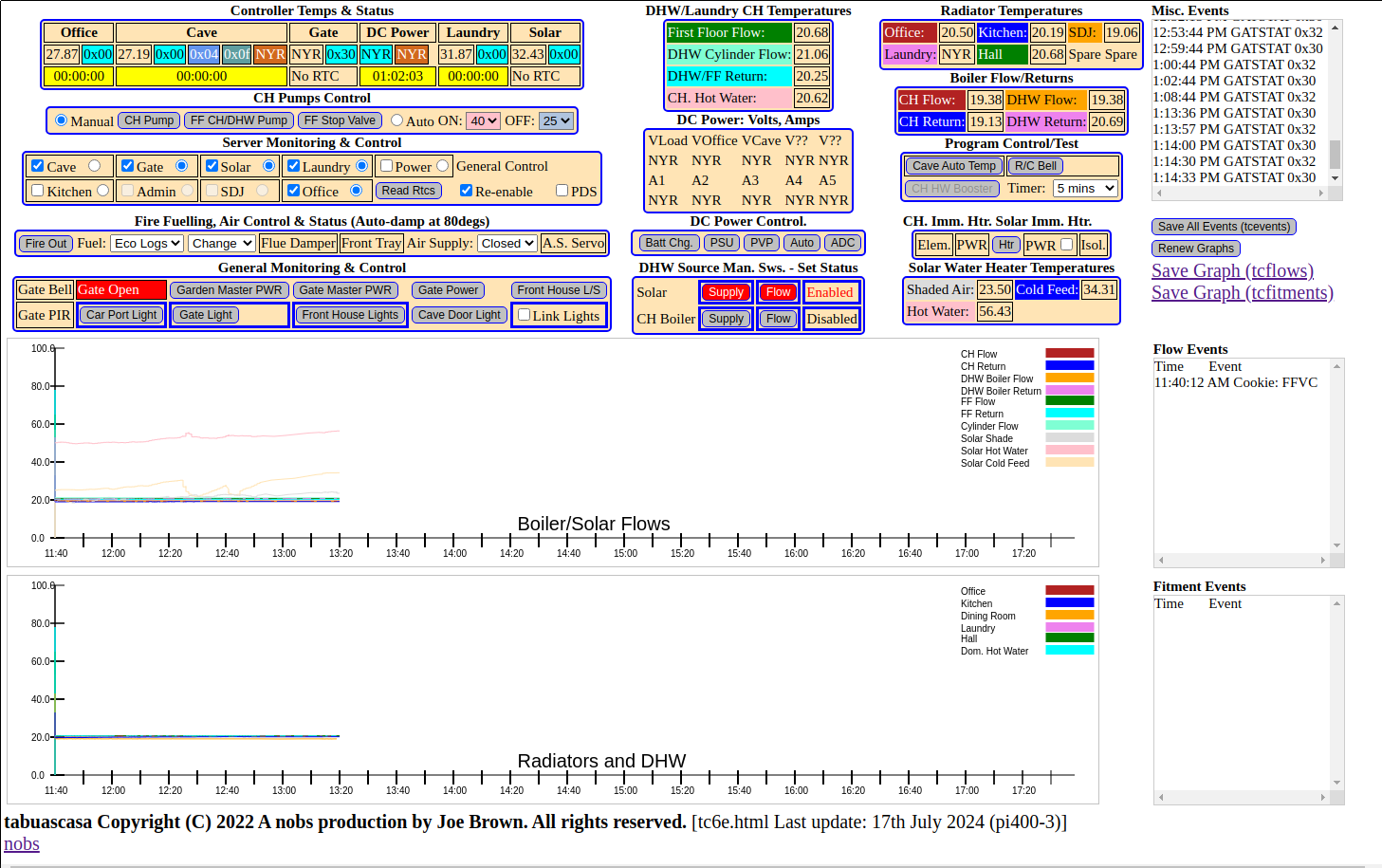
Click on above to show full screen on your browser. Click ‘Back’ button (<-) to return.
Foreword. My electricity bills are significant, and this is to be expected, but they should also reflect that I power most of my equipment from a DC suppy, which is supplemented by a solar PVP system.
I’ve already conducted tests in the ground floor of my house, and I’m at a loss as to compare these with my supplier’s readings. A comprehensive record of my usage needs to be made, and has prompted the purchase of a clamp-driven, wifi-based unit.
To access this I have looked at Google ‘Home Assistant’. Oh Dear! Yes, the device is supported, but outputting information? that woudd seem to take over a whole display on computer or ‘phone.
The ‘protocols’ and ‘implementation’ on git, look like a bad nightmare. Home Assistant? I’m not so sure, it isn’t for me. But on this occasion, I will use it – sparingly.
‘Getting to the point’ – as Jeff Lynne once sung. I do not believe that Google ‘Home Assistant’ is for me in a general sense.
Later, I will post some screenshots of the mains monitor in use.
See here.
History – quite a long one.
I emigrated to Portugal in the back end of 2012. I had purchased and moved in to a house situated in a small hamlet near Miranda Do Corvo.
The house had been constructed around 10 years before, but never really ‘finished’ off.
It being winter, my first priority was central heating.
This, I both designed, and installed myself, the details I will spare you.
Rather than having to rely solely on ‘manual’ control of pumps etc., I carved a controller from a raspberry pi, using mostly the Dallas 1-wire system. (which actually has 3 wires!)
The user interface was the crummy python interface based on Tk.
As ‘stuff’ was added to the 1-wire network, ie. switches, thermometers etc., performance suffered – badly, and reliability suffered also.
I decided to split up functionality to discrete areas of the house, so that these could be served separately by a dedicated wifi-connected server. This work began almost two years ago, and is still ongoing.
The ‘Tk’ based user interface was dumped, a new machine, raspberry pi 400 and a website (apache) installed.
Servers are implemented as ‘socket’ servers, a set of intermediate php scripts installed, and the interface demonstrated is a web page written in HTML5, javascript and jquery.
To date, this is still a ‘work in progress’
Hardware.
Servers are ESP8266-based WEMOS D1 mini, programmed in C++ on an Arduino IDE.
Thermometers are the Dallas 1-wire type:
Mains voltage ‘detection’ is implemented using opto-couplers.
Mains current ‘detection’ uses a home made ‘slit’ toroid and Hall device, to generate a ‘square’ wave (or none, if no current).
Proximity detectors are generally Hall devices, connected through a Dallas 1-wire unit.
A servo motor controls ‘fresh’ air supply to the log-burner/CH Heating unit in the ‘Cave’.
I could go on, but almost everything in the system is basic, cheap, and readily available.
Operation.
Servers are activated/de-activated by a checkbox.
Servers are invigilated every 3 seconds or so. This activity is monitored by the on/off appearance of a radio-button.
Control of pumps etc., can be automatic, based on presets, or manual, using a button.
StatusesUsually indicated by a colour change.
Technologies. HTML5, PHP, javascript, jquery, C++.
Development Environment. Pi400, Geany, Arduino IDE.
Note – No Windoze required nor desired.
Note – No 3rd party installers, packagers or similar bullshit.
For the unwary: ‘nobs’ is my ‘tag’ – yes, it means ‘No Bullshit’
Google. Google have created many useful things,many of which I use. But never forget, Google wants to make money – well nothing wrong with that, I’ll agree. But I’ll take and use the good, and ignore the bad, and Google Home Assistant would seem to be a pushed in the sales direction.
That their protocols are accepted and used for various ‘commodities;, is fine also. But they all make the same mistake – Look at your home, now cram all the infantile interfaces for each of your home ‘devices’ onto one ‘screen’. Well you can’t, but I’ve shown how much I can display and control on one screen, and here’s my challenge – do as well with ‘Google Home Assistant’.
To be continued..
 joesportugal